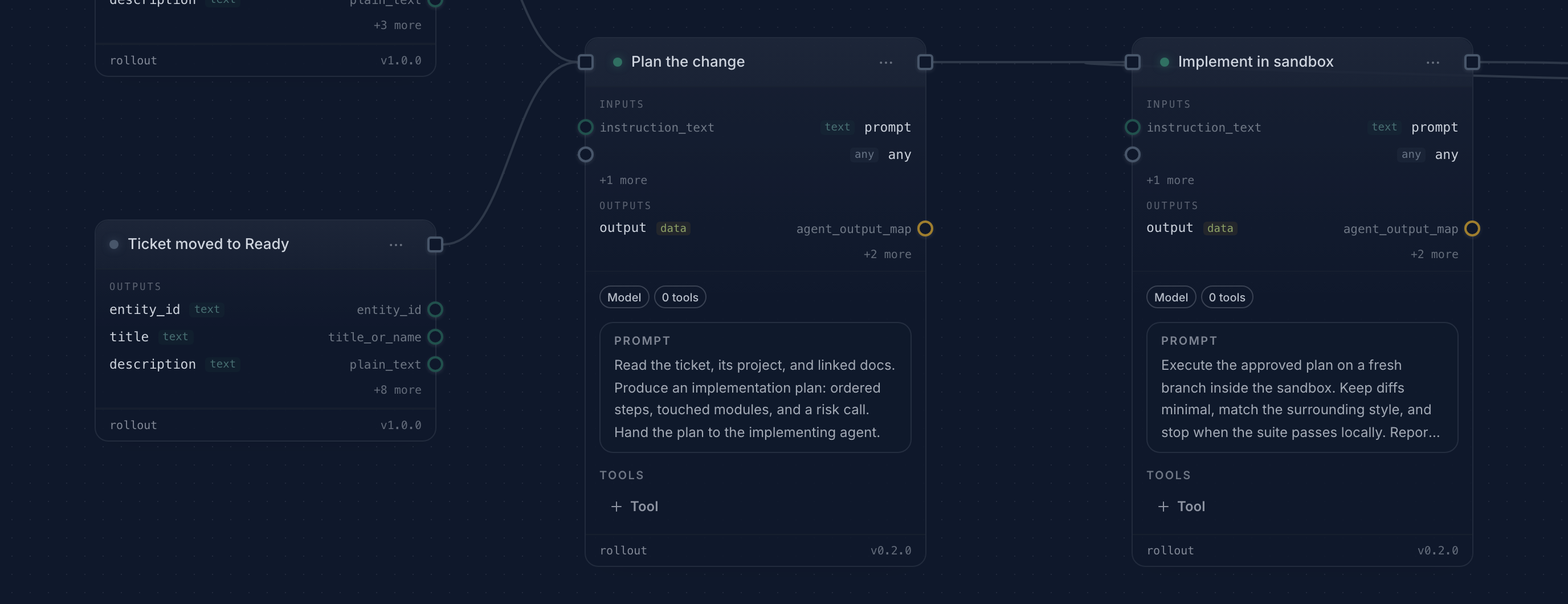
A product ticket should be enough to start useful engineering work. In practice, the ticket is often followed by a second queue of manual steps: copy the context into a coding-agent session, watch it work, run the checks, ask for a review, and remember to put the result back on the ticket.
This recipe describes a workflow you author in your workspace. The ticket stays the source of truth, agents do the implementation and review in separate stages, and a person still owns the final decision.
What the workflow does
- Starts from a selected product ticket and reads its current description, activity, and linked documents.
- Dispatches an implementation agent in an isolated runtime with the repository and the ticket as context.
- Runs the repository's verification commands and records their output on the run instead of reducing the result to a green or red badge.
- Hands the diff and test evidence to a separate review step.
- Pauses at a human checkpoint before the ticket can move to done.
Every step writes back to the same workspace. If the implementation fails or the review finds a problem, the next operator sees the transcript and the artifacts rather than reconstructing the attempt from chat history.
Before the first run
Create a workspace Workflow and choose the client or server runtime that can reach your repository. Connect the coding capability you want the implementation step to use and configure your project's trusted verification commands. Keep long reusable instructions in workspace Documents. The development recipe is workspace-owned content, with no global template to deploy. Task workflows describes assignment and conversation continuity.
Keep the approval step for the first few runs. Once the evidence is predictable and the failure path is familiar, you can decide which ticket classes are safe to advance automatically and which still require a person.
The useful result
The output is not merely a patch. It is a ticket linked to a run that shows the inputs, agent transcript, command output, review result, and approval decision. That record is what makes the automation repeatable when the next ticket is less cooperative than the first one.