rollout / the process layer for AI agents

AI agents that work your queue.

Tickets, support threads, documents, mail. Rollout holds the work, puts agents on it under rules you set, and lets your AI build the screens you need on top. Steps run on our cloud, your cluster or your laptop, and each one leaves a receipt.

Cloud Pro $299/mo per workspace Business self-host $24,000/yr pricing →

fig. 1 · one item through a run illustration
receipt input output events usage approver

01 / the gap

Agents already do real work. The process around them is still a chat window.

chat window

Each session starts from zero. Quality depends on who wrote the prompt that day, and the record ends when the tab closes.

someone's laptop

The agent runs wherever it was started, with whatever keys were on that machine. Nobody else can see the run.

five tools of glue

Tracker, workflow tool, agent framework, CI and chat each hold a piece. The glue breaks first, and nobody owns it.

Rollout gives agents the process you already give people: a queue to pull from, rules for where they run, a gate a person owns, and a record of every step.

02 / one workspace, three jobs

Store the work. Run it with agents. Show it however you need.

store

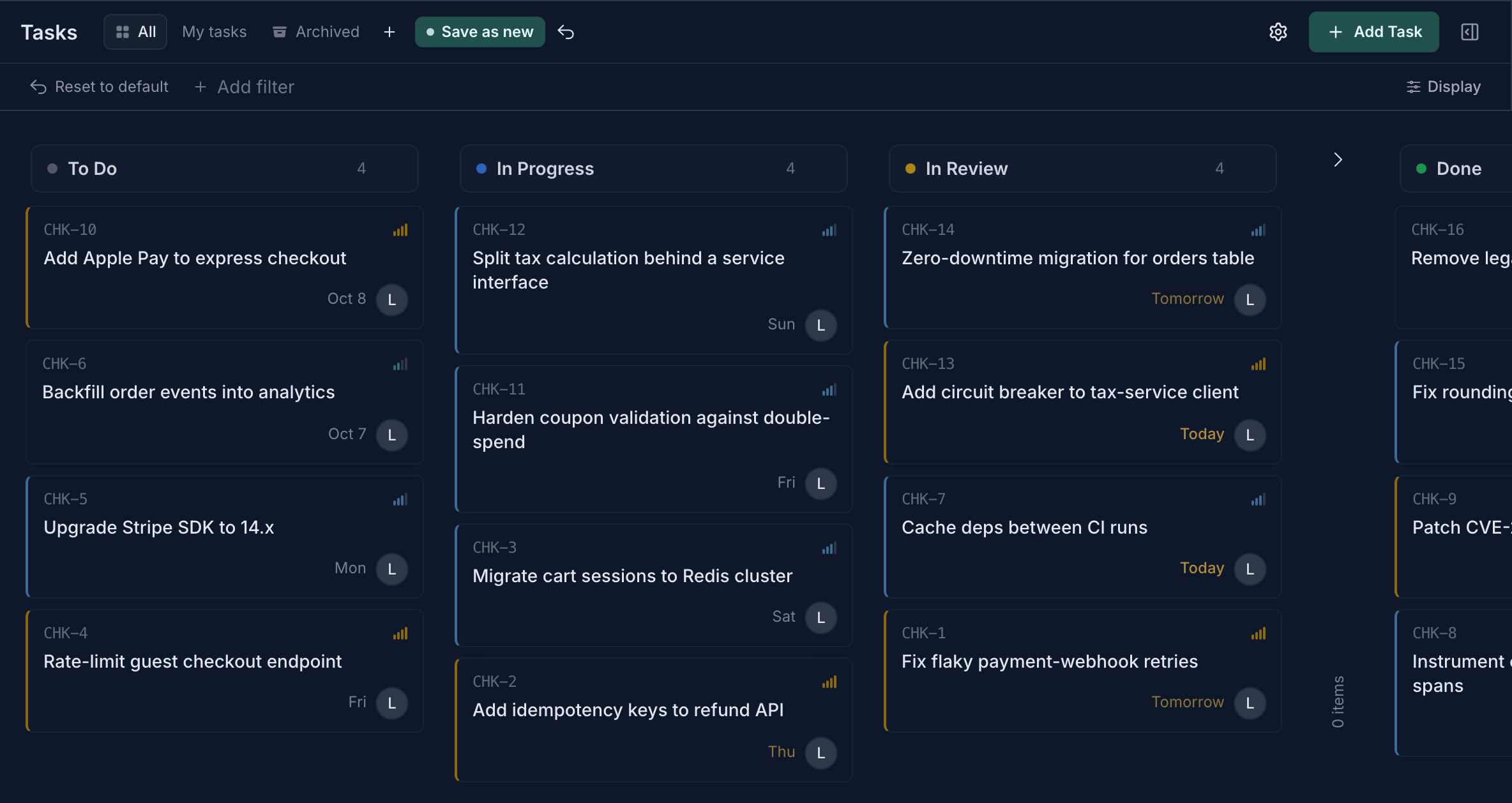
The queue ships with the product

Projects, tasks, milestones and objectives are built in. Custom record types turn anything else your team tracks into a catalog with its own fields, formulas and views. Agents read the same records people read, with the project, links and history attached, so nobody pastes context into a prompt.

rollout.dev/tasks
A task board with To Do, In Progress, In Review and Done columns
Task board. Captured from a demo workspace.

run

Workflows put agents on it, under rules

A record change, a webhook, a message or a schedule starts a workflow. Steps branch, loop, retry and wait. AI steps call only the tools you attached, and a tool can require a person's approval before it runs. An approval step suspends the run without holding compute and resumes it on the decision.

Loading the canvas…

show

Ask for the screen. Get an app on your data.

Describe the view your team needs to your AI assistant. Over Rollout's MCP server it writes an app, compiles it in a sandbox and publishes it next to your records. The app reads only the queries you grant, its actions call governed tools, and every publish is a version you can roll back to. Share it with the team or a public link.

fig. 2 · prompt in, app out illustration

03 / placement

One run can cross four places.

Each step picks where it executes. The control plane keeps the run, the queue and the record together, so a step on your laptop shows up in the same history as a step in the cloud.

fig. 3 · one run, four places illustration
rollout cloud
Ephemeral gVisor pods per workspace, restricted pod security, policy-controlled egress.
your cluster
Kubernetes or Docker under the Business license. Your network, your keys.
ssh host
A step runs on a machine you already have. Nothing to install on the host.
your desktop
The desktop client runs shell, browser, and Claude Code or Codex on your own subscription, with approvals on the device.

04 / evidence

Every step leaves a receipt.

When a run goes sideways, you read the steps. Inputs, outputs, streamed events, model usage and the approval that let the work through are stored with the run. Credentials the engine injected are scrubbed before anything is stored or broadcast, and redaction fails closed.

Workflows publish as immutable releases, and each run records the definition it executed, so the history shows exactly which version did the work.

fig. 4 · what a step keeps field shapes
step
Summarize the thread
runs on
rollout cloud · rollout.ai
input
record, project, linked docs
output
typed fields, validated
events
streamed and kept
model usage
tokens, metered per step
approved by
a named person, with time
secrets
redacted before storage

05 / where it sits

Teams tape three tools together. Rollout ships them as one.

Trackers

good at

Holding the work and who owns it.

leaves you

Nothing runs. Automation lives somewhere else and syncs back.

Workflow tools

good at

Routing events between apps.

leaves you

An agent is one more API call, with no queue, owner or gate around it.

Agent frameworks

good at

The model and tool loop, as a library.

leaves you

Persistence, approvals, the audit trail and the UI are yours to build.

Rollout

holds

The queue, the runs, the gates, the receipts and the screens.

built on

One database, one permission model, one record of what happened.

06 / security

The part your security review reads first.

security overview →
Workspace isolation Shipped

Tenant scope lives in the query

Protected reads carry a workspace identity and apply access checks before rows are hydrated. Switching workspaces means switching datasets, not filtering a shared page.

Sharing and permissions →
Credentials Shipped

Write-only, envelope-encrypted secrets

Secrets use AES-256-GCM under an envelope data key. Hosted Rollout keeps the wrapping key in Cloud KMS; self-hosted deployments supply their configured master key.

Secret handling →
Code isolation Cloud

Ephemeral gVisor runner pods

Cloud code steps run in tenant namespaces with restricted pod security, dropped Linux capabilities, resource limits, and policy-controlled HTTPS egress.

Security overview →
Run output Fail closed

No registry answer means no raw strings

Injected credentials are scrubbed from step inputs, outputs, errors, final results, and live chunks before storage or broadcast. An unavailable registry suppresses strings.

Workflow security →
Operator evidence Append only

Sensitive actions leave a receipt

Secret access records actor, action, outcome, and timestamp without the value. Hosted deployments also copy secret-audit events to the observability pipeline.

Audit-log contract →
Web boundary Production

Nonce-based CSP and hardened sessions

Production enforces HTTPS and HSTS; forms use CSRF protection; login renews the session; and inline scripts require a per-request Content-Security-Policy nonce.

Authentication and web security →

07 / status · alpha

What runs today, and what doesn't yet.

Rollout is in alpha. This list is the claim; the changelog and docs are the evidence.

  • shipped Projects, tasks, milestones, objectives, documents and custom record types
  • shipped Workflows with record, webhook, message and schedule triggers; branches, loops, subflows, retries
  • shipped Human approval steps that suspend a run and resume it on the decision
  • shipped AI steps that call only attached tools, with per-tool approval
  • shipped Shell steps on Rollout cloud, Docker, Kubernetes or SSH
  • shipped Desktop client: local shell, browser, Claude Code and Codex
  • shipped Apps authored over MCP, compiled in a sandbox, released as numbered versions
  • shipped MCP server over OAuth 2.1 with read, write and admin scopes
  • shipped Envelope-encrypted secrets and fail-closed output redaction
in progress

Assign a task to a named agent

The agent carries the task through triage, implementation, review and delivery, talking in the task thread. Piloting on our own backlog; not yet proven end to end.

changelog → · docs →

Put agents on your queue

Join the waitlist for an alpha workspace. Early workspaces keep founder pricing.

Prefer to talk it through? Talk to the founder

Want to see it on your own process first? See pricing or talk it through with the founder.