We can't find the internet
Attempting to reconnect
Something went wrong!
Hang in there while we get back on track
00 / we run this · ops board
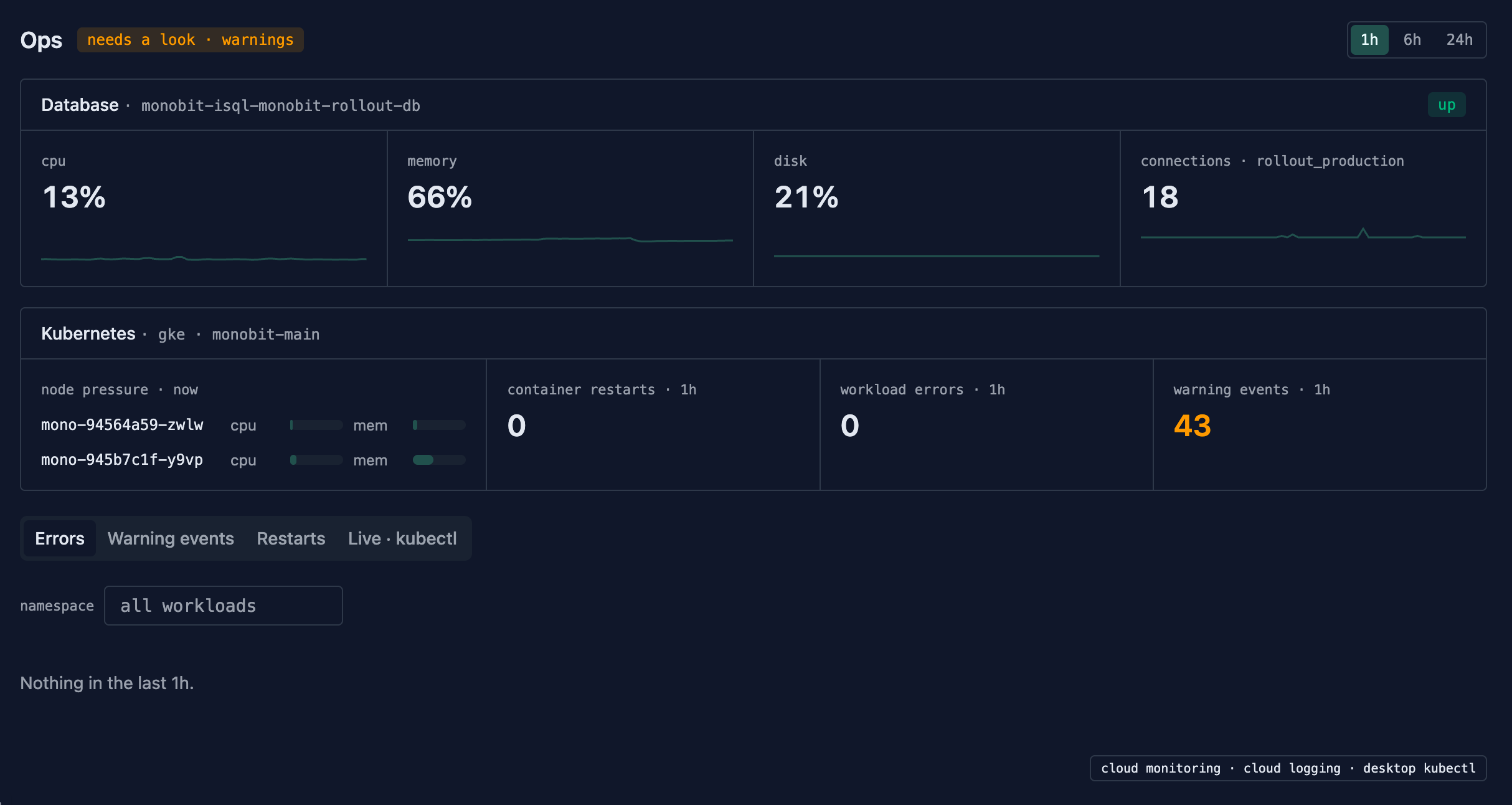
Our production database and cluster, on one screen we built in Rollout
Rollout runs on GKE with a Cloud SQL database. The screen we check them on is an app in our own workspace. It reads Cloud Monitoring and Cloud Logging live, shows only the signals we act on, and runs kubectl on a laptop when the live state of a pod matters. Claude Code built it over Rollout's MCP server.
01 / the board
Only what we act on
The database panel shows whether Cloud SQL is up, and its CPU, memory, disk and connection count with a trend for the last hour, six hours or day. The Kubernetes panel shows memory and CPU pressure on each node, container restarts, workload errors and warning events. Each signal has a threshold, and the header shows the worst one. The tabs below open the error log, the warning events, restarts by namespace, and live kubectl.
02 / what we dropped
Nothing is stored twice
The first version ran a workflow every 30 minutes that wrote a health record. We retired it. Cloud Monitoring already keeps these series, at a finer grain than a 30-minute record ever would, and alerting belongs in its alert policies. So the app queries the source when it opens and keeps nothing. Records in Rollout are for work that has an owner and a next step, and a CPU sample has neither.
03 / under rules
The app can look, and that's all
The app reaches Google Cloud and the laptop only through the six tools it was granted. The project, the connection, the device and every kubectl command are fixed on those tools. The app fills a PromQL query, a log filter, a time range, a namespace and a pod name, each checked by the tool before it runs. Nothing it can call writes anything.
04 / day one
What it showed the first day
The warning events panel stayed amber, 43 in the hour we captured. Two ExternalSecrets fail to sync every few minutes because the Secret Manager entries they point at don't exist, a real misconfiguration. The rest were probe failures while deploys rolled Rollout's own pods. The database sat at 13% CPU and 66% memory.
05 / how it was built
An assistant did the building, people did the approving
Claude Code wrote the two Google Cloud nodes in the Rollout codebase, then worked in the workspace over MCP: it configured the tools and wrote and published the app. People approved the service account change, pasted the key into the connection, activated the tools, and approved the laptop's kubectl runs and each app upload.
- 01 Service account with Logs Viewer, Monitoring Viewer and Kubernetes Engine Cluster Viewer, declared in OpenTofu.
- 02 Google Cloud connection allowed only logging.read and monitoring.read. A person pasted the key; it is encrypted and never enters workflow data.
- 03 Two nodes added to the Google Cloud integration: Query Cloud Logging and Query Cloud Monitoring. They ship to every workspace.
- 04 Six reviewed tools: PromQL now and over a range, log queries on the server; pods, events and pod logs through kubectl on one laptop.
- 05 Ops app in React, published from source and granted those six tools.
The build found two platform bugs, both fixed before this page went up. The connection form blamed the name field for a malformed scope, and a tool preset that referenced a caller-filled value reached ordinary nodes as the literal placeholder.
06 / the queries
Copy them
Cloud SQL up · PromQL on Cloud Monitoring
max(cloudsql_googleapis_com:database_up{database_id="PROJECT_ID:INSTANCE"})
Cloud SQL CPU, memory and disk · PromQL, one query each
avg(cloudsql_googleapis_com:database_cpu_utilization{database_id="PROJECT_ID:INSTANCE"})
avg(cloudsql_googleapis_com:database_memory_utilization{database_id="PROJECT_ID:INSTANCE"})
avg(cloudsql_googleapis_com:database_disk_utilization{database_id="PROJECT_ID:INSTANCE"})
Cloud SQL connections to one database · PromQL
sum(cloudsql_googleapis_com:database_postgresql_num_backends{database_id="PROJECT_ID:INSTANCE",database="DATABASE"})
Node pressure · PromQL
max by (node_name) (kubernetes_io:node_cpu_allocatable_utilization)
sum by (node_name) (kubernetes_io:node_memory_allocatable_utilization)
Container restarts over the range · PromQL
sum(increase(kubernetes_io:container_restart_count{monitored_resource="k8s_container"}[1h]))
Workload errors · Cloud Logging
resource.type="k8s_container" AND severity>=ERROR AND resource.labels.namespace_name!="kube-system"
Kubernetes warning events · Cloud Logging
logName="projects/PROJECT_ID/logs/events" AND jsonPayload.type="Warning"
07 / limits
- Pod readiness and deployment rollout state come from the laptop's kubectl tab. The cluster doesn't export kube-state metrics to Cloud Monitoring, so the server-side panels can't see them.
- Billing isn't on the board yet. It needs Cloud Billing's export to BigQuery, which this project doesn't have.
- The Live tab needs the laptop online with the desktop client running. The server-side panels don't.
- Cloud Logging allows 60 read calls a minute per project by default. The board makes a handful per view.
- The board is a screen, not a pager. Alerts stay in Cloud Monitoring.
Build the board for your own stack
The logging and monitoring nodes work with any Google Cloud project. Join the waitlist for an alpha workspace.
Prefer to talk it through? Talk to the founder
Node reference: workflow nodes